
Business Physics AI Simulation Lab
The following is a Human-Agentic-AI Report Created in the Business Physics AI Simulation Lab (BusinessPhysics.AI). It is a current, source-backed comparison for small businesses, entrepreneurs, students, and non-technical decision-makers.
This Document is for Educational Purposes Only.
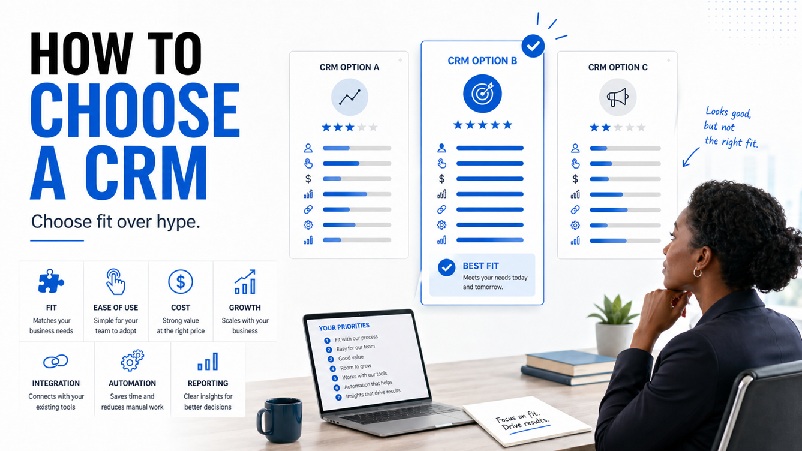
CRM choice is a fit decision
Choosing a CRM can feel more complicated than it should. Every platform claims to help a business grow, manage relationships, automate sales, and close more deals. Those claims can be useful, but they do not automatically tell a small business owner, entrepreneur, student, or manager which CRM is the right fit.
A Customer Relationship Management system, or CRM, is a tool that helps an organization manage relationships with customers, prospects, partners, and leads. At its most basic level, it replaces scattered spreadsheets, sticky notes, inbox reminders, and memory. At a more advanced level, it can support sales pipelines, email marketing, automation, customer service, reporting, forecasting, artificial intelligence, and team collaboration.
The central point remains simple: the strongest CRM choice is not necessarily the one with the most features. The strongest CRM choice is the one that fits the way the business actually works and that people will actually use.
| Business Physics decision standard: Choose the CRM that improves relationships, follow-up, decision quality, and growth without creating unnecessary complexity. |
What problem are you trying to solve?
Before comparing CRMs, the business should ask one simple question: What are we trying to improve?
· Leads are being forgotten.
· Follow-ups are inconsistent.
· Sales opportunities are tracked manually.
· Customer information is spread across emails, spreadsheets, and phones.
· The owner cannot see what stage each deal is in.
· Marketing and sales are disconnected.
· The business wants to automate repetitive work.
· Managers need better reporting.
· The team is growing and needs a shared system.
A small business that only needs contact management should not choose the same CRM as a large organization with complex sales teams, marketing automation, compliance needs, and advanced reporting. CRM selection should be based on fit, not hype.

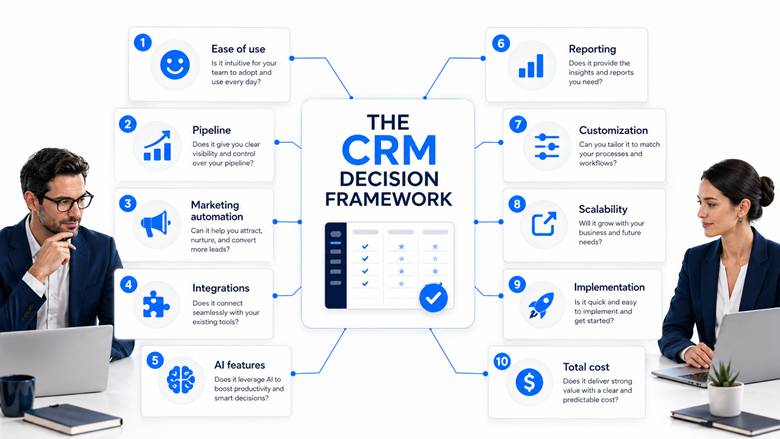
CRM comparison variables
Ease of use: If the CRM is too complicated, people will not use it consistently. Adoption may matter more than advanced features.
Sales pipeline management: A pipeline shows where each opportunity stands: new lead, contacted, qualified, proposal sent, negotiation, won, or lost.
Marketing automation: Some businesses need landing pages, email campaigns, segmentation, lead nurturing, and automated follow-ups, not just sales tracking.
Integrations: A CRM should connect with the tools the business already uses, such as Gmail, Outlook, Google Calendar, Microsoft Teams, Mailchimp, QuickBooks, Shopify, Zapier, or accounting software.
AI features: Modern CRMs increasingly include AI assistance for email drafting, lead scoring, call summaries, forecasting, workflow suggestions, and customer support automation.
Reporting and analytics: A CRM should help managers answer practical questions about leads, conversion, pipeline strength, campaign performance, and where deals get stuck.
Customization: Some teams need custom fields, pipelines, dashboards, approval rules, territory management, or complex workflows.
Scalability: A CRM that works for a two-person business may not work for a 50-person organization.
Implementation complexity: Some CRMs can be set up quickly; others require training, data cleanup, consultants, integrations, and governance.
Total cost: The visible subscription price is not the full cost. Count users, contacts, marketing contacts, AI usage, onboarding, integrations, training, consultants, and migration.
CRM comparison table
Pricing and feature information below was checked against current vendor/source pages on April, 2026. Reminder that this does not constitute business advice, we urge all to always re-check directly on the vendor site before any purchase.
| CRM | Strong fit when… | Main strength | Main caution | Pricing/Plan notes |
| Pipedrive | Small and mid-sized sales teams that need pipeline discipline | Visual sales pipeline, deal stages, activity follow-up | No permanent free plan found in current positioning; costs vary by plan, billing cycle, seats, add-ons, and location | Pipedrive uses plan-based, per-seat pricing; official support notes Lite, Growth, Premium, and Ultimate plans, annual/monthly billing, add-ons/top-ups, and currency/location effects. |
| HubSpot CRM | Startups, SMBs, and teams that want CRM plus marketing/sales/service in one ecosystem | Free CRM tools, broad ecosystem, integrations, AI through Breeze | Free tier limits and premium feature access must be checked carefully; costs can rise with paid hubs, seats, contacts, and advanced tools | HubSpot states its free CRM is 100% free with no expiration; current CRM page specifies up to 2 users and 1,000 contacts, with premium editions for advanced features. |
| Zoho Bigin | Very small businesses moving from spreadsheets to basic CRM | Simple CRM, low cost, Zoho ecosystem path | Less powerful than Zoho CRM; record and user limits matter | Bigin’s free plan allows 1 user and 500 records; Express/Premier are per-user paid editions, with Express commonly positioned around $7/user/month annually. |
| Zoho CRM | Growing SMBs needing more customization and automation than Bigin | Customizable sales platform, workflows, reports, mobile app, Zoho ecosystem, Zia AI | More configuration effort than simpler CRMs; AI and advanced capabilities depend on edition | Zoho CRM’s free edition is free forever for 3 users; paid editions and AI/agent capabilities vary by tier and region. |
| Freshsales | SMB sales teams that want CRM, built-in communication, and AI-assisted selling | Free plan for small teams, Kanban views, email templates, built-in phone/live chat, Freddy AI add-ons | Smaller third-party ecosystem than HubSpot/Salesforce; AI/bot sessions and add-ons require attention | Freshsales lists a free plan at $0 for 3 users and notes Freddy AI Agent session packs as add-ons. |
| Salesforce Sales Cloud / Agentforce Sales | Complex, scalable CRM environments; also offers entry-level suites | Highly configurable CRM, AI/Agentforce positioning, sales/service/marketing ecosystem | Total cost and implementation complexity can rise quickly; not automatically the right fit for very small teams | Salesforce lists Agentforce Sales tiers including Starter Suite, Pro Suite, Enterprise, Unlimited, and Agentforce 1 Sales; it also promotes Free Suite for up to 2 users and Starter Suite. |
| Microsoft Dynamics 365 Sales | Organizations already committed to Microsoft 365, Outlook, Teams, Excel, Power BI, and Azure | Microsoft ecosystem fit, AI/Copilot capabilities, enterprise sales automation | More enterprise-oriented; some plans have minimum-seat implications and may require specialist support | Microsoft Canada lists Sales Professional at CAD $88.20/user/month, Enterprise at CAD $142.50/user/month, and Premium at CAD $203.50/user/month, paid yearly. Relationship Sales pricing is variable and notes a 10-seat minimum. |
| monday Sales CRM | Visual, workflow-driven teams that want boards, dashboards, and no-code processes | Visual pipelines, customizable boards, dashboards, Monday AI credits | The page displays pricing with team-size assumptions; minimum-seat and total-monthly-cost effects must be checked | monday Sales CRM shows Basic at $12/seat/month billed annually with a displayed 10-seat total of $120/month, and Standard at $17/seat/month with a displayed 10-seat total of $170/month. |
| Capsule CRM | Small businesses prioritizing simple relationship and pipeline management | Clean contact management, sales/project/customer service positioning, paid plan trial | Pricing and limits should be verified; less advanced than full enterprise or marketing platforms | Capsule positions itself as putting sales, projects, and customer service in one place and offers a 14-day trial of paid plans. Public pricing commonly begins around $18/user/month annually, but confirm current regional pricing. |
| Less Annoying CRM | Solo entrepreneurs, consultants, and very small teams that want simplicity | Single transparent price, unlimited contacts/companies and pipelines, 30-day trial | Limited advanced automation, analytics, and enterprise features | Less Annoying CRM lists $15/user/month plus tax, with no tiers, hidden fees, or contracts. |
| Insightly | Service and project-based firms needing CRM plus project handoff | CRM, marketing automation, support, and all-in-one options; sales-to-project fit | Support and advanced features can depend on tier; verify total implementation/support costs | Insightly’s pricing page positions CRM, marketing automation, AppConnect, support/ticketing, and all-in-one options. |
| Copper CRM | Teams deeply committed to Google Workspace | Google Workspace orientation, pipelines, project management, workflow automation in higher tiers | Less compelling outside Google Workspace; contact limits and tier gating matter | Copper shows Basic at $23/seat/month annually, Professional at $59/seat/month annually with a 15,000 contact limit, and Business at $99/seat/month annually. |
| Close CRM | Outbound and calling-heavy sales teams | Built-in calling, email, SMS, centralized inbox, Chloe AI sales agent | Entry price may not include the calling/AI/workflow features a sales team actually needs | Close currently shows Essentials at $35/seat/month annually, Growth at $99, and Scale at $139; Growth adds Chloe, automated workflows, Power Dialer, and AI Email Assistant. |
| Streak CRM | Gmail-first users who want CRM inside the inbox | CRM directly inside Gmail; shared pipelines and AI credits in paid tiers | Less suitable for larger teams needing a standalone CRM outside Gmail | Streak lists Pro at $49/user/month annually and Pro+ at $69/user/month annually; it positions itself as CRM for sales and customer relationships directly inside Gmail. |
| Nutshell CRM | SMB sales and marketing teams wanting practical CRM features | Low entry CRM pricing, no seat minimums/maximums, included webchat/AI chatbot/forms/landing pages/email marketing capabilities | Add-ons can change total cost; marketing contacts and SMS/message usage matter | Nutshell lists CRM plans from $13/user/month annually, with transparent add-ons such as Marketing and Engagement; it says there are no setup fees or surprise charges, but optional add-ons are priced separately. |
| Keap | Service businesses needing CRM plus serious automation, email, text, and payments | CRM, workflow automation, email marketing, lead capture, text marketing, support and implementation orientation | Higher starting price; pricing can vary with contacts, users, text/voice tiers, and services | Keap’s current pricing page lists its platform starting at $299/month, billed at $2,988/year, and notes optional text/voice tiers and add-ons. |
CRM-by-CRM analysis
Pipedrive
Strong fit when: Small and mid-sized sales teams that need pipeline discipline
Why it belongs in the comparison: Visual sales pipeline, deal stages, activity follow-up
Main caution: No permanent free plan found in current positioning; costs vary by plan, billing cycle, seats, add-ons, and location
Pricing/Plan notes: Pipedrive uses plan-based, per-seat pricing; official support notes Lite, Growth, Premium, and Ultimate plans, annual/monthly billing, add-ons/top-ups, and currency/location effects.
HubSpot CRM
Strong fit when: Startups, SMBs, and teams that want CRM plus marketing/sales/service in one ecosystem
Why it belongs in the comparison: Free CRM tools, broad ecosystem, integrations, AI through Breeze
Main caution: Free tier limits and premium feature access must be checked carefully; costs can rise with paid hubs, seats, contacts, and advanced tools
Pricing/Plan notes: HubSpot states its free CRM is 100% free with no expiration; current CRM page specifies up to 2 users and 1,000 contacts, with premium editions for advanced features.
Zoho Bigin
Strong fit when: Very small businesses moving from spreadsheets to basic CRM
Why it belongs in the comparison: Simple CRM, low cost, Zoho ecosystem path
Main caution: Less powerful than Zoho CRM; record and user limits matter
Pricing/Plan notes: Bigin’s free plan allows 1 user and 500 records; Express/Premier are per-user paid editions, with Express commonly positioned around $7/user/month annually.
Zoho CRM
Strong fit when: Growing SMBs needing more customization and automation than Bigin
Why it belongs in the comparison: Customizable sales platform, workflows, reports, mobile app, Zoho ecosystem, Zia AI
Main caution: More configuration effort than simpler CRMs; AI and advanced capabilities depend on edition
Pricing/Plan notes: Zoho CRM’s free edition is free forever for 3 users; paid editions and AI/agent capabilities vary by tier and region.
Freshsales
Strong fit when: SMB sales teams that want CRM, built-in communication, and AI-assisted selling
Why it belongs in the comparison: Free plan for small teams, Kanban views, email templates, built-in phone/live chat, Freddy AI add-ons
Main caution: Smaller third-party ecosystem than HubSpot/Salesforce; AI/bot sessions and add-ons require attention
Pricing/Plan notes: Freshsales lists a free plan at $0 for 3 users and notes Freddy AI Agent session packs as add-ons.
Salesforce Sales Cloud / Agentforce Sales
Strong fit when: Complex, scalable CRM environments; also offers entry-level suites
Why it belongs in the comparison: Highly configurable CRM, AI/Agentforce positioning, sales/service/marketing ecosystem
Main caution: Total cost and implementation complexity can rise quickly; not automatically the right fit for very small teams
Pricing/Plan notes: Salesforce lists Agentforce Sales tiers including Starter Suite, Pro Suite, Enterprise, Unlimited, and Agentforce 1 Sales; it also promotes Free Suite for up to 2 users and Starter Suite.
Microsoft Dynamics 365 Sales
Strong fit when: Organizations already committed to Microsoft 365, Outlook, Teams, Excel, Power BI, and Azure
Why it belongs in the comparison: Microsoft ecosystem fit, AI/Copilot capabilities, enterprise sales automation
Main caution: More enterprise-oriented; some plans have minimum-seat implications and may require specialist support
Pricing/Plan notes: Microsoft Canada lists Sales Professional at CAD $88.20/user/month, Enterprise at CAD $142.50/user/month, and Premium at CAD $203.50/user/month, paid yearly. Relationship Sales pricing is variable and notes a 10-seat minimum.
monday Sales CRM
Strong fit when: Visual, workflow-driven teams that want boards, dashboards, and no-code processes
Why it belongs in the comparison: Visual pipelines, customizable boards, dashboards, Monday AI credits
Main caution: The page displays pricing with team-size assumptions; minimum-seat and total-monthly-cost effects must be checked
Pricing/Plan notes: monday Sales CRM shows Basic at $12/seat/month billed annually with a displayed 10-seat total of $120/month, and Standard at $17/seat/month with a displayed 10-seat total of $170/month.
Capsule CRM
Strong fit when: Small businesses prioritizing simple relationship and pipeline management
Why it belongs in the comparison: Clean contact management, sales/project/customer service positioning, paid plan trial
Main caution: Pricing and limits should be verified; less advanced than full enterprise or marketing platforms
Pricing/Plan notes: Capsule positions itself as putting sales, projects, and customer service in one place and offers a 14-day trial of paid plans. Public pricing commonly begins around $18/user/month annually, but confirm current regional pricing.
Less Annoying CRM
Strong fit when: Solo entrepreneurs, consultants, and very small teams that want simplicity
Why it belongs in the comparison: Single transparent price, unlimited contacts/companies and pipelines, 30-day trial
Main caution: Limited advanced automation, analytics, and enterprise features
Pricing/Plan notes: Less Annoying CRM lists $15/user/month plus tax, with no tiers, hidden fees, or contracts.
Insightly
Strong fit when: Service and project-based firms needing CRM plus project handoff
Why it belongs in the comparison: CRM, marketing automation, support, and all-in-one options; sales-to-project fit
Main caution: Support and advanced features can depend on tier; verify total implementation/support costs
Pricing/Plan notes: Insightly’s pricing page positions CRM, marketing automation, AppConnect, support/ticketing, and all-in-one options.
Copper CRM
Strong fit when: Teams deeply committed to Google Workspace
Why it belongs in the comparison: Google Workspace orientation, pipelines, project management, workflow automation in higher tiers
Main caution: Less compelling outside Google Workspace; contact limits and tier gating matter
Pricing/Plan notes: Copper shows Basic at $23/seat/month annually, Professional at $59/seat/month annually with a 15,000 contact limit, and Business at $99/seat/month annually.
Close CRM
Strong fit when: Outbound and calling-heavy sales teams
Why it belongs in the comparison: Built-in calling, email, SMS, centralized inbox, Chloe AI sales agent
Main caution: Entry price may not include the calling/AI/workflow features a sales team actually needs
Pricing/Plan notes: Close currently shows Essentials at $35/seat/month annually, Growth at $99, and Scale at $139; Growth adds Chloe, automated workflows, Power Dialer, and AI Email Assistant.
Streak CRM
Strong fit when: Gmail-first users who want CRM inside the inbox
Why it belongs in the comparison: CRM directly inside Gmail; shared pipelines and AI credits in paid tiers
Main caution: Less suitable for larger teams needing a standalone CRM outside Gmail
Pricing/Plan notes: Streak lists Pro at $49/user/month annually and Pro+ at $69/user/month annually; it positions itself as CRM for sales and customer relationships directly inside Gmail.
Nutshell CRM
Strong fit when: SMB sales and marketing teams wanting practical CRM features
Why it belongs in the comparison: Low entry CRM pricing, no seat minimums/maximums, included webchat/AI chatbot/forms/landing pages/email marketing capabilities
Main caution: Add-ons can change total cost; marketing contacts and SMS/message usage matter
Pricing/Plan notes: Nutshell lists CRM plans from $13/user/month annually, with transparent add-ons such as Marketing and Engagement; it says there are no setup fees or surprise charges, but optional add-ons are priced separately.
Keap
Strong fit when: Service businesses needing CRM plus serious automation, email, text, and payments
Why it belongs in the comparison: CRM, workflow automation, email marketing, lead capture, text marketing, support and implementation orientation
Main caution: Higher starting price; pricing can vary with contacts, users, text/voice tiers, and services
Pricing/Plan notes: Keap’s current pricing page lists its platform starting at $299/month, billed at $2,988/year, and notes optional text/voice tiers and add-ons.

CRM candidates by business situation
Very small business
Strong candidates: Zoho Bigin, Less Annoying CRM, Capsule CRM, Streak CRM. These tools are easier to understand and less likely to overwhelm a small team.
Sales-driven business
Strong candidates: Pipedrive, Freshsales, Close CRM, monday Sales CRM. These are useful when lead follow-up, pipeline visibility, and sales activity management are the main problems.
Marketing and sales together
Strong candidates: HubSpot, Zoho CRM, Nutshell, Keap. These make more sense when CRM must support campaigns, lead nurturing, forms, landing pages, and automation.
Enterprise or larger organization
Strong candidates: Salesforce, Microsoft Dynamics 365 Sales, HubSpot Enterprise, Zoho CRM / Zoho One. These are more appropriate when complexity, reporting, AI, compliance, and scalability matter.
Google Workspace users
Strong candidates: Copper, Streak, HubSpot, Zoho CRM. Copper and Streak deserve special attention when the business lives inside Gmail and Google Workspace.
Microsoft-based organizations
Strong candidates: Microsoft Dynamics 365 Sales, HubSpot, Salesforce, Zoho CRM. Dynamics is especially relevant when Microsoft 365, Outlook, Teams, Excel, and Power BI are already central to the organization.
Practical selection guidance
Consider HubSpot if: the business wants a free CRM starting point and may later need marketing, sales, service, content, automation, integrations, and AI tools in one platform.
Consider Pipedrive if: the main problem is sales discipline, follow-ups, and pipeline visibility.
Consider Zoho Bigin if: the business is very small, cost-sensitive, and needs a basic CRM rather than a complex platform.
Consider Zoho CRM if: the business is growing and wants customization, automation, and integration without jumping immediately to enterprise-level CRM complexity.
Consider Freshsales if: the business wants sales CRM, communication features, and AI-assisted selling in a relatively accessible SMB package.
Consider Less Annoying CRM if: the business wants simplicity and transparent pricing more than advanced automation.
Consider Salesforce if: the organization needs scalable, highly configurable CRM capabilities and is ready for the implementation and cost discipline that can come with that power.
Consider Microsoft Dynamics 365 Sales if: the company already operates heavily inside Microsoft 365 and wants CRM to align with Outlook, Teams, Excel, Power BI, Copilot, and Microsoft’s broader enterprise ecosystem.
Consider Keap if: the business is a service-based company that wants CRM, automation, email marketing, lead capture, and payments/text features in one higher-cost platform.
Conclusion: Start simple, then grow
The safest CRM strategy for many small businesses is to match the platform to the current level of complexity. A small business does not need to begin with a complex enterprise CRM if it only needs contact management and basic pipeline tracking.
A solo entrepreneur may be better served by Less Annoying CRM, Zoho Bigin, Capsule, or Streak. A growing sales team may benefit from Pipedrive or Freshsales. A business that wants to connect marketing and sales may prefer HubSpot, Zoho CRM, Nutshell, or Keap. A larger organization with complex reporting, security, AI, and integration requirements may need Salesforce or Microsoft Dynamics 365 Sales.
The right question is not: Which CRM has the most features? The better question is: Which CRM will help this specific business build stronger customer relationships, follow up better, make better decisions, and grow without creating unnecessary complexity? That is the CRM worth choosing.
Source notes with full URLs
1. Pipedrive pricing: https://www.pipedrive.com/en/pricing
2. Pipedrive pricing mechanics: https://support.pipedrive.com/en/article/how-does-pricing-work-in-pipedrive
3. HubSpot free CRM: https://www.hubspot.com/products/crm
4. HubSpot Breeze AI: https://www.hubspot.com/products/artificial-intelligence
5. Zoho Bigin pricing: https://www.bigin.com/pricing.html
6. Zoho CRM pricing: https://www.zoho.com/crm/zohocrm-pricing.html
7. Zoho Zia AI: https://www.zoho.com/zia/
8. Freshsales pricing: https://www.freshworks.com/crm/pricing/
9. Salesforce Agentforce Sales pricing: https://www.salesforce.com/ca/sales/pricing/
10. Salesforce Free Suite / Starter Suite: https://www.salesforce.com/ca/small-business/starter/
11. Salesforce pricing overview: https://www.salesforce.com/ca/pricing/
12. Microsoft Dynamics 365 Sales pricing Canada: https://www.microsoft.com/en-ca/dynamics-365/products/sales/pricing
13. monday Sales CRM pricing: https://monday.com/crm/pricing
14. Capsule CRM pricing/sign-up: https://capsulecrm.com/signup/
15. Capsule CRM product overview: https://capsulecrm.com/
16. Less Annoying CRM pricing: https://www.lessannoyingcrm.com/pricing
17. Insightly pricing: https://www.insightly.com/pricing-plans/
18. Copper CRM pricing: https://www.copper.com/pricing
19. Close CRM pricing: https://close.com/pricing
20. Streak CRM pricing: https://www.streak.com/pricing
21. Streak CRM product overview: https://www.streak.com/
22. Nutshell CRM pricing: https://www.nutshell.com/pricing
23. Keap pricing: https://keap.com/pricing
 English
  Arabic
  Chinese
  French
  Hindi
Hindi  Portuguese
  Spanish
Leave a Reply
You must be logged in to post a comment.